Creating high-end, cinematic AI art isn’t just about throwing keywords at a generator; it’s about understanding texture, lighting, and compositional physics.
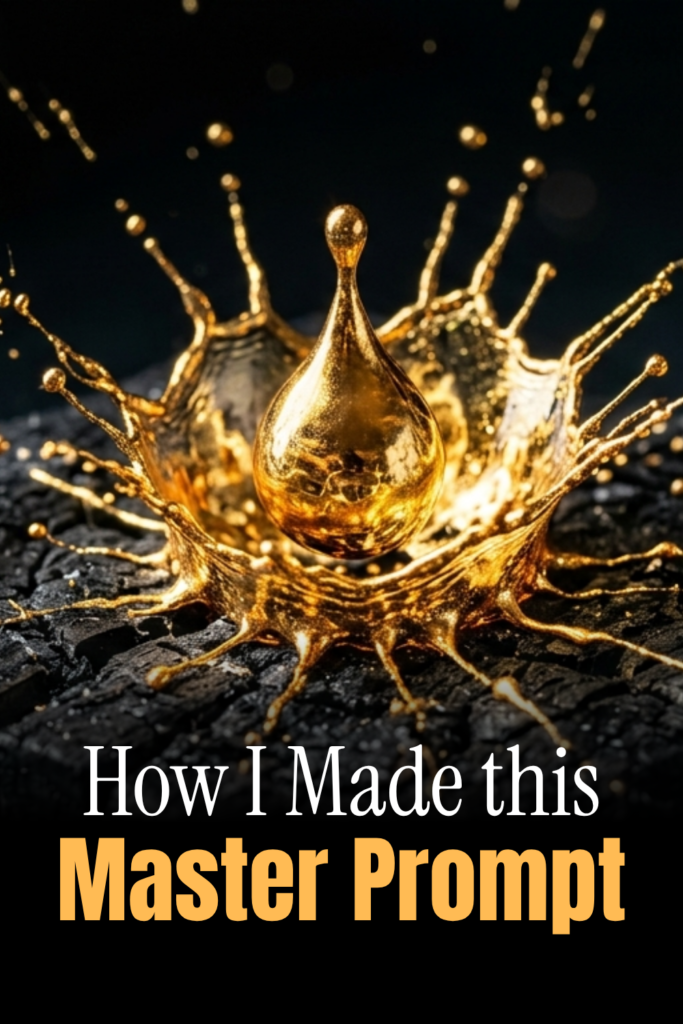
One of the most sought-after aesthetics in digital art is the “liquid gold” effect—the perfect blend of luxury and fluid dynamics. Today, I’m breaking down exactly how I created this stunning image of a gold splash on charred charcoal, and how you can use the same “Master Prompt” logic for your own projects.
The Blueprint: Anatomy of the Master Prompt
To get that ultra-premium look, we used this specific prompt:
“A hyper-realistic, macro close-up of a single drop of liquid gold frozen mid-splash on a piece of charred black charcoal. Intricate textures, internal reflections, cinematic lighting, 8k resolution, shot on a 100mm macro lens, sharp focus, vibrant contrast against a dark moody background.”
Let’s dissect why this works so you can replicate it:
1. The Subject & Action
- “Liquid gold frozen mid-splash”: Using the word “frozen” is key. It tells the AI to capture high-speed photography vibes rather than a blurry mess.
- “Charred black charcoal”: This provides a high-contrast foundation. Gold looks its best when it has a dark, matte surface to reflect against.
2. The Technical Lens
- “100mm macro lens”: In real photography, a 100mm macro lens is the gold standard for close-ups. It creates a shallow depth of field, making the gold “pop” while the background softly blurs.
- “Internal reflections”: This is the “secret sauce.” It forces the AI to calculate how light bounces inside the liquid, giving it that heavy, metallic depth rather than looking like yellow paint.
3. Lighting & Environment
- “Cinematic lighting”: This moves the image away from a “flat” look and introduces dramatic highlights and shadows.
- “Vibrant contrast”: By specifying contrast, we ensure the blacks of the charcoal are deep and the yellows of the gold are glowing.
3 Tips for Customizing Your Splash
Once you’ve mastered the gold splash, try these variations to expand your portfolio:
- Change the Surface: Swap “charred charcoal” for “jagged obsidian,” “wet marble,” or even “a velvet cloth” to see how the gold interacts with different textures.
- Adjust the Color Temperature: Add “warm amber glow” or “cool blue moonlight” to the lighting description to change the mood from luxury to sci-fi.
- Modify the Fluid: Replace “liquid gold” with “molten silver,” “iridescent oil,” or “liquid neon” for entirely different visual styles using the same splash physics.
The Final Result
By combining technical photography terms with specific material descriptions, you move from “generating an image” to “directing a digital photoshoot.” The result is a crisp, 8k-ready masterpiece that looks like it belongs in a high-end jewelry campaign or a luxury tech advertisement.
Ready to try it? Copy the prompt above and drop it into your favorite AI generator. Tag me in your results—I’d love to see what you create!